consulting-pptx-skill for Claude Code: A Board Deck With a Built-In Reviewer
By Hafizh Yuwan Fauzan · 2026-10-09
The second article in a series on the Claude skills I use every day.
The deck passed every automated rule check: 0 failures. Then a reviewer that had never seen it gave it 46 out of 70.
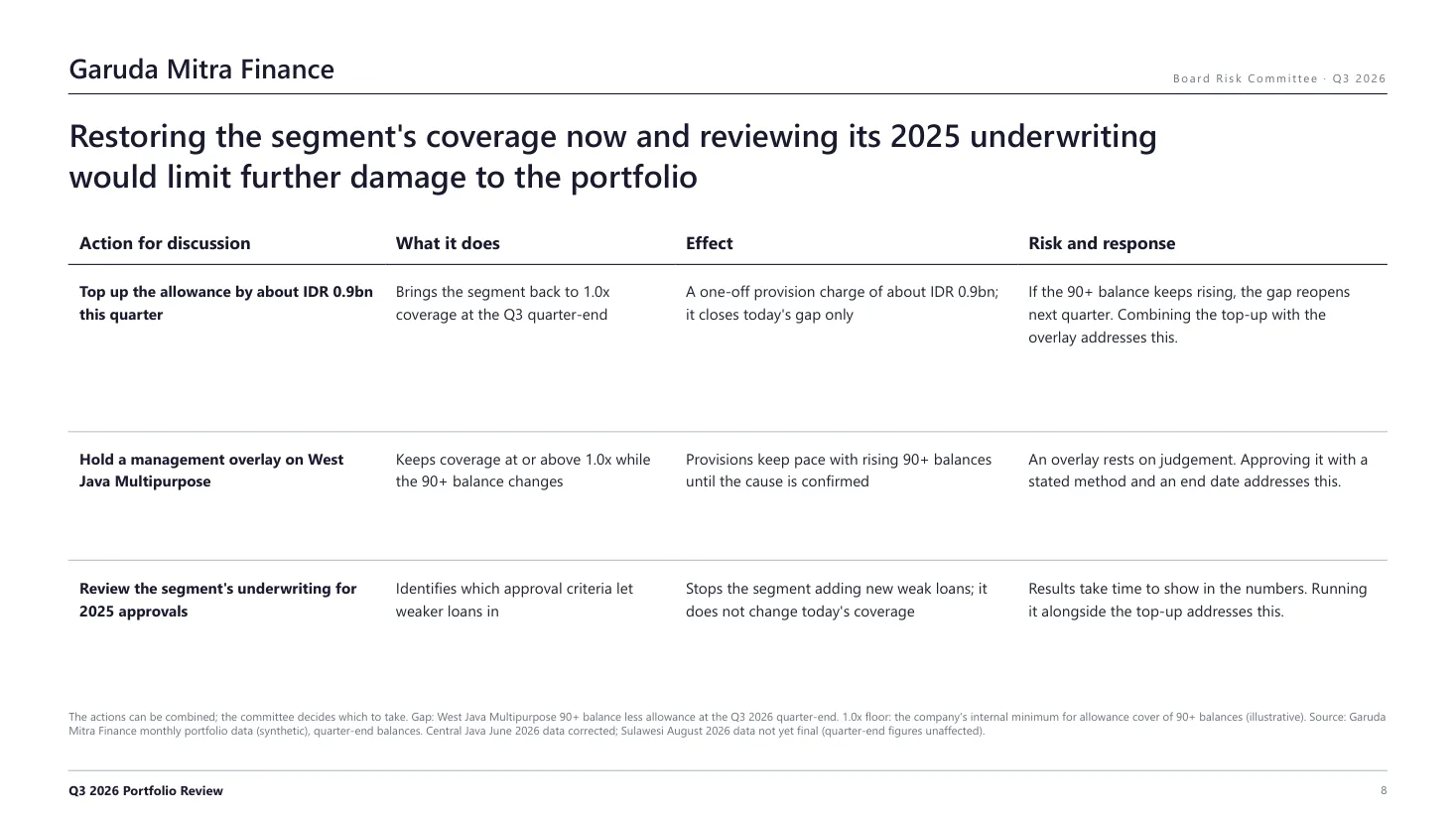
The reviewer's sharpest catch was on the last content page. Its title promised that two actions "would stop" the problem. The table underneath listed three actions, and said one of them "does not change today's coverage". The title and the table argued with each other, and none of the checks noticed, because checks look at rules, not at what a page claims.
That page was made with consulting-pptx-skill, a free skill for Claude Code that turns slide-writing rules into a working process: define the deck, write the storyline, build it from a parts library, run two checkers, then hand it to a reviewer who knows nothing about how it was made. I rebuilt the same fictional Q3 portfolio review from my Excel-to-PowerPoint article, so the two results sit side by side. All data is synthetic.
What consulting-pptx-skill is
It's a skill made by Carnot AI, the team behind the Jinba AI workflow platform, and released under the MIT licence. Its English description calls it "a Claude Code skill for generating boardroom-quality decks". If "skill" is new to you, I explained it in the Superpowers article: a file of instructions Claude loads only when a task calls for it (Anthropic's Claude Code documentation on skills). This one installs as a folder in ~/.claude/skills/.
The facts below come from the consulting-pptx-skill repository on GitHub, checked on 9 October 2026.
| As of October 2026 | |
|---|---|
| Install in Claude Code | git clone https://github.com/carnot-tech/consulting-pptx-skill.git ~/.claude/skills/consulting-pptx-skill |
| Licence | MIT |
| Core | A slide rulebook (references/slide-rules.md), a rule checker, a layout checker, 62 HTML slide parts |
| Output | HTML, one section per 16:9 slide, printed to PDF with Chrome; a PPTX converter was added after I installed it |
| Language | Rules, prompts and checker messages are in Japanese |
The heart of it is the rulebook. The README says its value is not the templates or scripts but that text file, built one line at a time from comments received in real deck reviews. A few of its rules: the title states the conclusion; one message per page; facts on the left, what they mean on the right; trends must be charts, not tables; no rounded corners; no "POINT" box at the bottom of a slide.
Step 1: Define before producing
My prompt was short, as usual:
make the q3 portfolio review deck for the board risk committee with consulting-pptx-skill, same story as the powerpoint one
The skill makes Claude read the whole rulebook before anything else. In the copy I had installed in September that was 330 lines across ten sections. Then it proposes a definition in three to five lines (purpose, deliverable, what is in and out of scope) and waits for agreement. Mine kept "decided recommendations" out of scope: the deck proposes options for discussion, and the committee decides. I answered "Yes, as written".
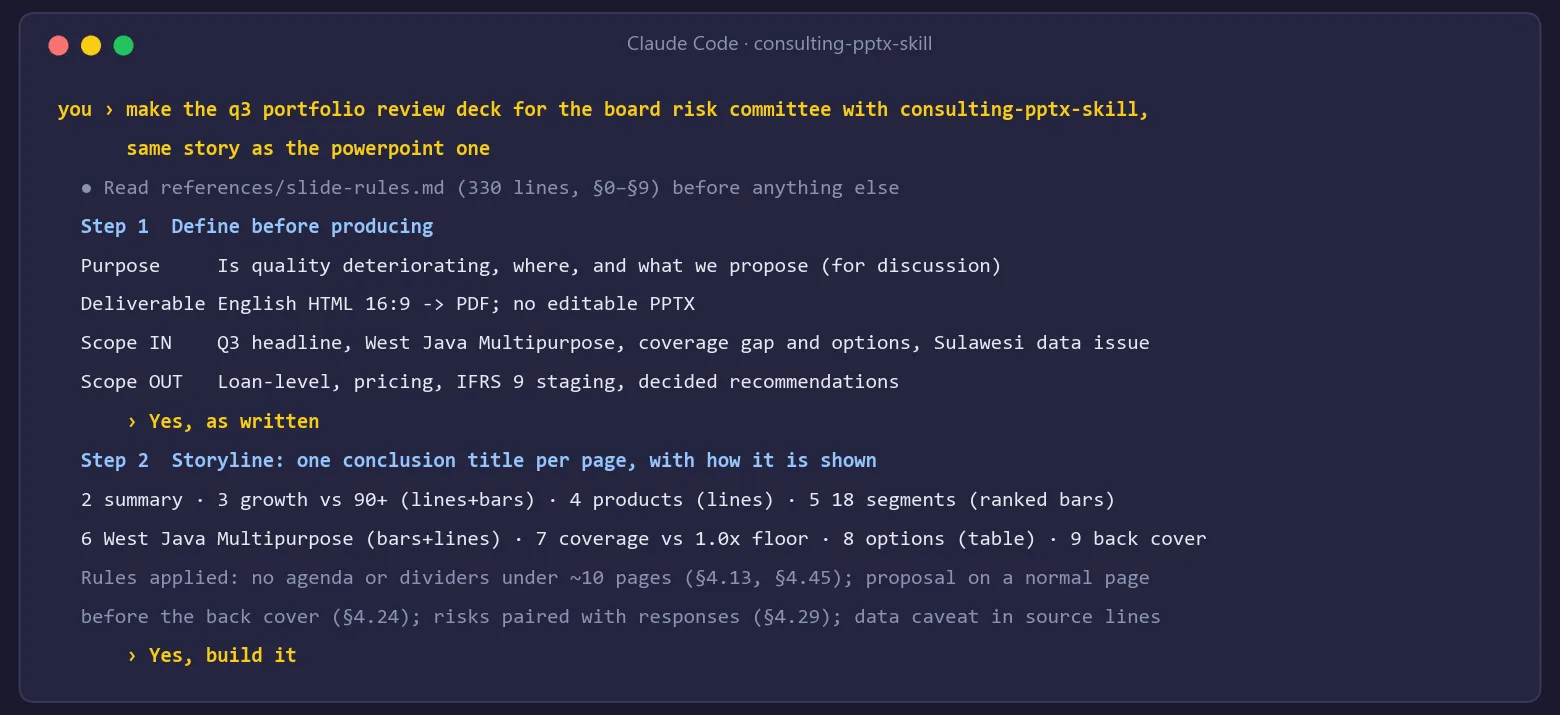
The second gate is the storyline: one conclusion title per page, each with how it will be shown (line chart, ranked bars, table). This is where the rules started to change the story I had told in PowerPoint:
- No agenda page or chapter dividers. For a deck of about ten pages or fewer, the rules say they aren't needed.
- No separate data-quality page. The open Sulawesi data issue moved into the source lines, where it qualifies the numbers it affects.
- The proposal gets its own normal page before the back cover, and every risk sits next to its response on the same page.
I approved the storyline with "Yes, build it".
Step 2: A draft full of placeholders, and a checker that passed it
The skill builds a first draft by stitching parts from its library: a cover, an executive summary, chart-and-insight pages, a comparison table, a back cover. Two things went wrong straight away.
On Windows, the script crashed before it did anything, because my console couldn't print the Japanese part names. Setting PYTHONIOENCODING=utf-8 fixed it. Mac and Linux terminals default to UTF-8, so this is a Windows problem.
Then I ran the rule checker on the raw draft, before replacing a single placeholder. It returned 0 FAIL / 3 WARN. The body still held 20 placeholders: "Text 1", "タイトル 2" (title 2), "YYYY", "会社名" (company name). The installed checker only looked for placeholders in titles.
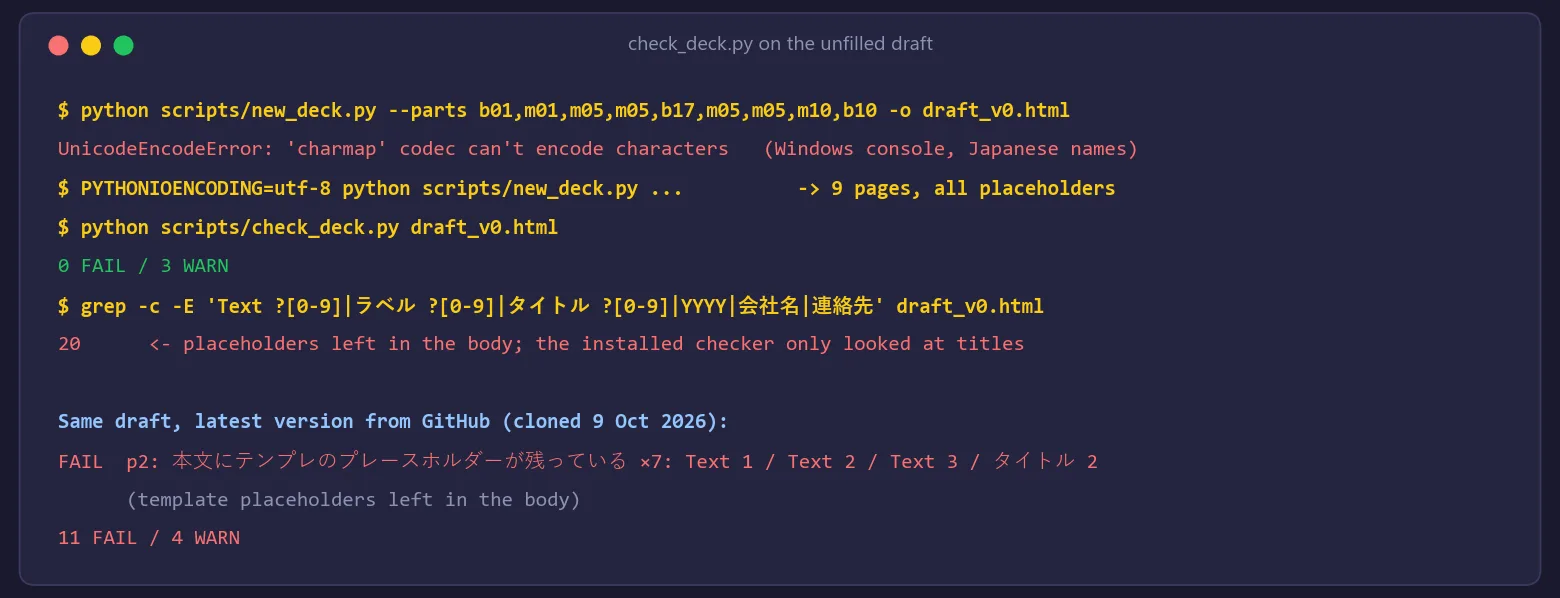
This surprised me most in the whole session. A clean check result is exactly what makes you stop looking. To be fair to the authors, it's fixed: the current version on GitHub reports 11 failures on the same draft, flagging leftover placeholders on every page. If you installed it a while ago, update it (git pull in the skill folder).
Step 3: Charts drawn from scratch, then looking at every page
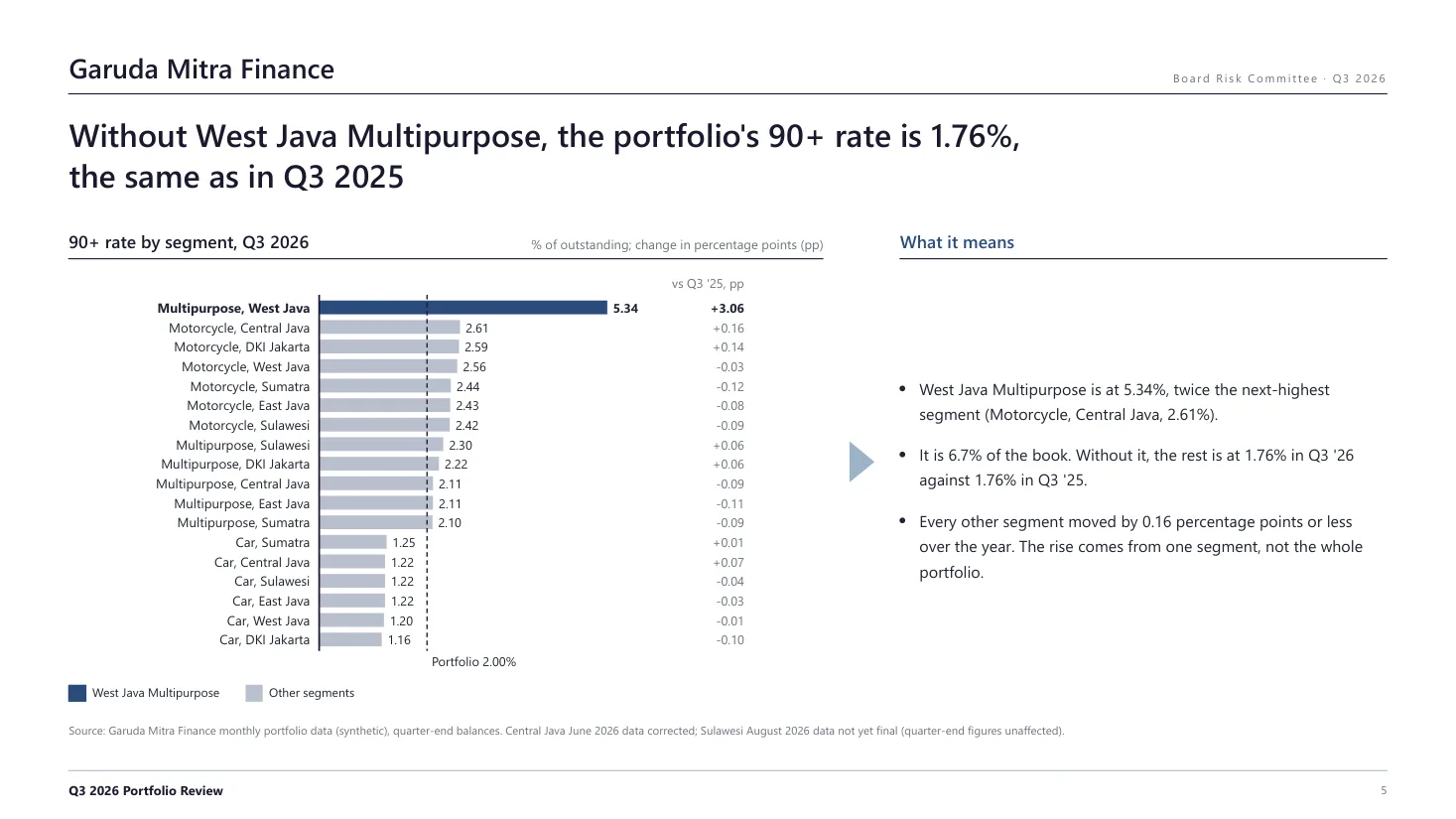
The rules don't allow a trend to be squeezed into a table, and the parts library's bar grid didn't fit the data, so Claude drew each of the five charts as SVG from the corrected Garuda Mitra numbers: the portfolio's 90+ rate over eight quarters, the three products, all 18 product and region segments ranked, West Java Multipurpose's growth against its delinquency, and loss coverage against a 1.0x floor. The deck also switched from the skill's default warm brown palette and Japanese serif headings to navy and Segoe UI, which the rules allow as long as both style blocks match.
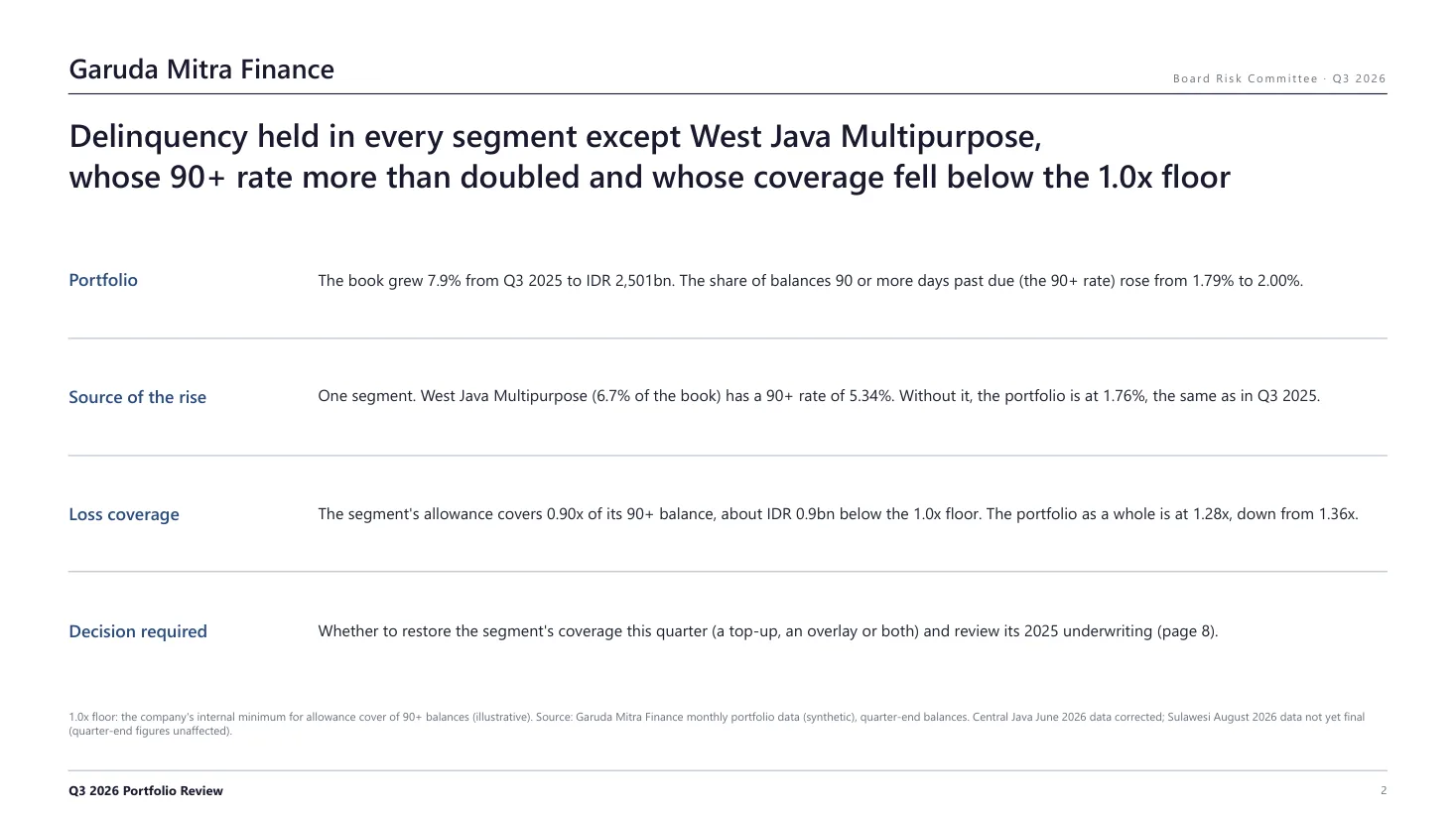
The finished pages passed both checkers: 0 FAIL on the rules, and the layout checker reported no overlaps or text running off the page. The skill still insists on printing the PDF and looking at every page, and it was right to. The looking found things no checker flagged: two value labels printed on top of each other, a "0.90x" label sitting on its own line, grey series names too pale to read, and titles that left a single word stranded on the second line.
Step 4: The fresh-eye review, 46 out of 70
The last step is the one I value most. The skill gives a ready-made review prompt to a separate agent that is told nothing about how the deck was made. It scores seven areas out of 10 and lists every place where a title, a chart and a number disagree. The prompt is in Japanese and checks Japanese phrasing, so Claude passed an English version with the language checks adapted.
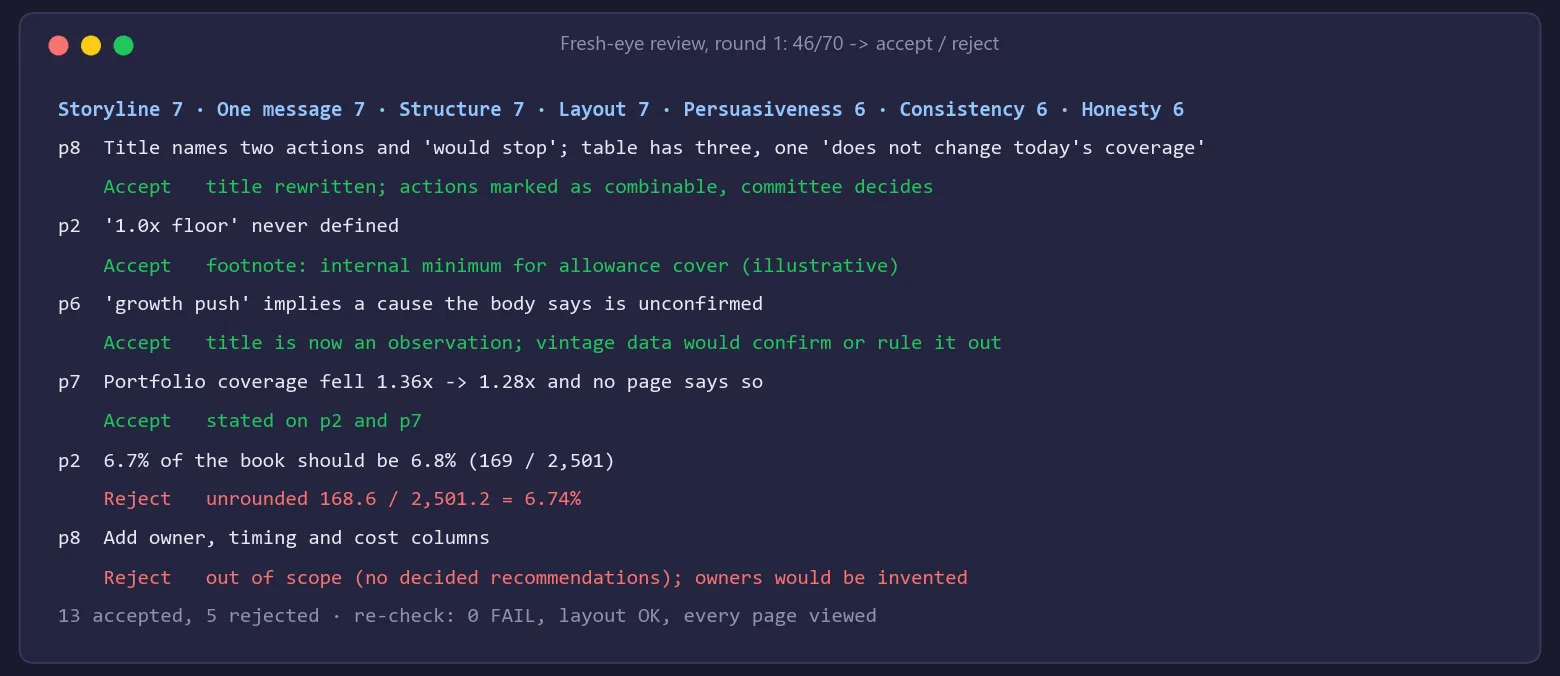
The deck scored 46/70. Beyond the title that contradicted its own table, it found:
- The "1.0x floor" was used on three pages and defined on none.
- A title said the segment's delinquency "followed" a 2025 "growth push", a cause the page itself admitted was unconfirmed.
- Portfolio coverage fell from 1.36x to 1.28x over the year. The chart showed it; no sentence said it.
- One segment appeared under four different names.
The skill doesn't let you fix everything blindly. Each finding goes into an accept-or-reject table with a reason. I accepted 13 and rejected 5. One rejection: the reviewer said "6.7% of the book" should be 6.8% because 169 divided by 2,501 is 6.76%. The unrounded figures give 6.74%, so 6.7% was right. A reviewer working from rounded labels can be wrong too, which is why the table asks for a reason either way.
After the fixes, the options page says what the table supports, and leaves the decision where it belongs:
The skill lets you choose how many review rounds to run. I chose one, then looked at the deck myself and moved on without a second.
Next to the Claude in PowerPoint version
The same coverage page, made two ways:
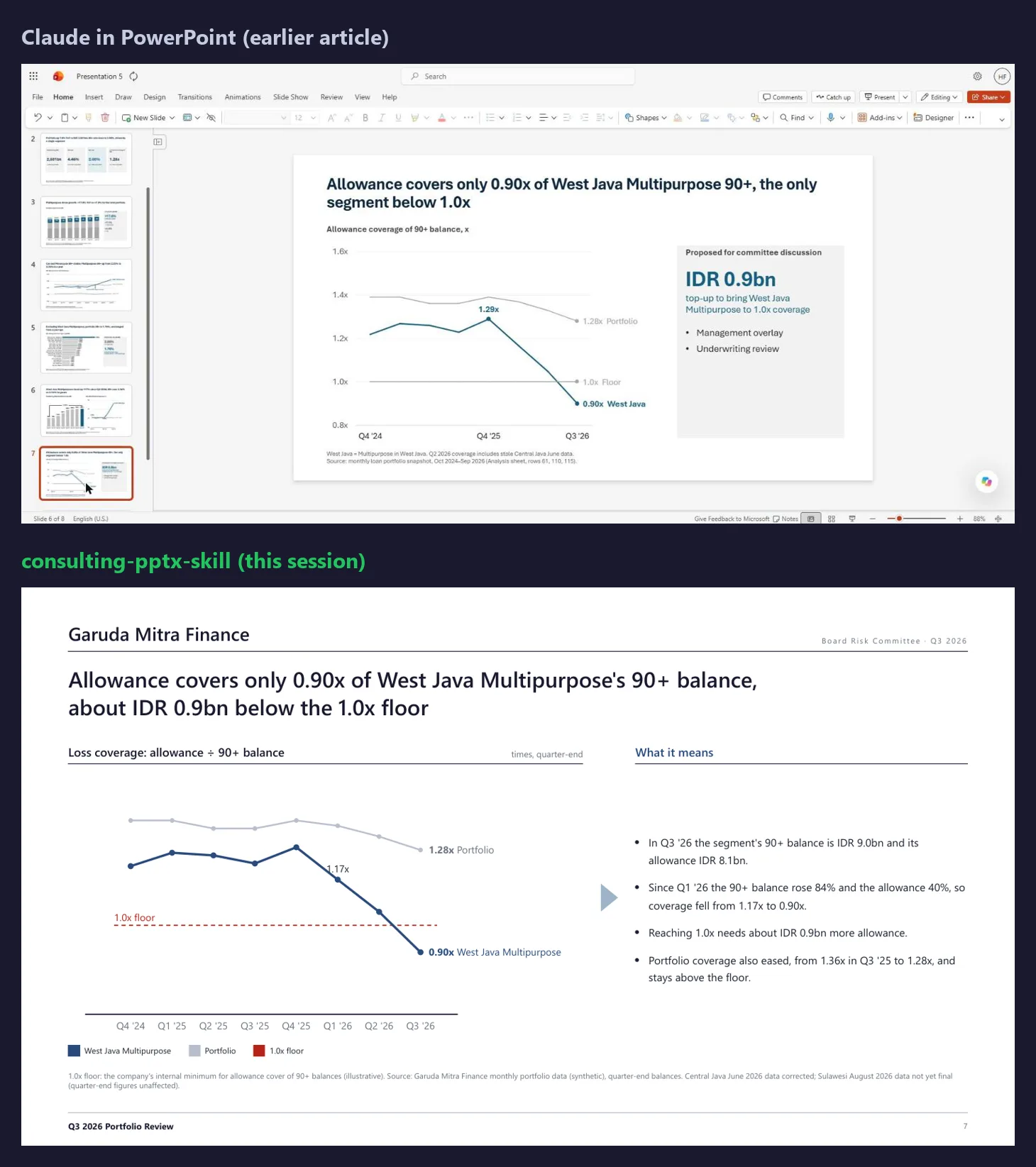
The Claude in PowerPoint version is a real, editable slide, built in my Excel-to-PowerPoint session from a workbook made with Claude in Excel and refreshed when the data changed. The skill's version has more discipline: a title that states the gap in rupiah, a right-hand column that explains what the chart means, the floor defined in a footnote, and a sentence on the portfolio's own falling coverage.
For me they do different jobs. I use the skill to get the logic right: the storyline, the titles, the evidence for each claim. I use the PowerPoint add-in when the deck has to be edited in PowerPoint, by me or by colleagues. Either way it's a first draft, and the wording is still mine to rewrite.
Converting to PPTX: what survives
The biggest limit of the version I installed was the output: HTML and PDF only, nothing a colleague could open and change. The current version adds a converter, html_to_pptx.py, which the skill uses only when you explicitly ask for PPTX. Its advice is to finish in HTML and convert once at the end.
I tried it on this deck. On Windows it crashed on another text-encoding error until I ran Python in UTF-8 mode (PYTHONUTF8=1). Then it produced a nine-slide PPTX. The titles, bullets and the options table are editable PowerPoint text and tables. Each chart becomes a single picture, as the README says, so you can't change a number in it. Every piece of text was set in Yu Gothic, a Japanese font, instead of the deck's Segoe UI. And opened in PowerPoint, one line on the summary slide ran past the right margin.
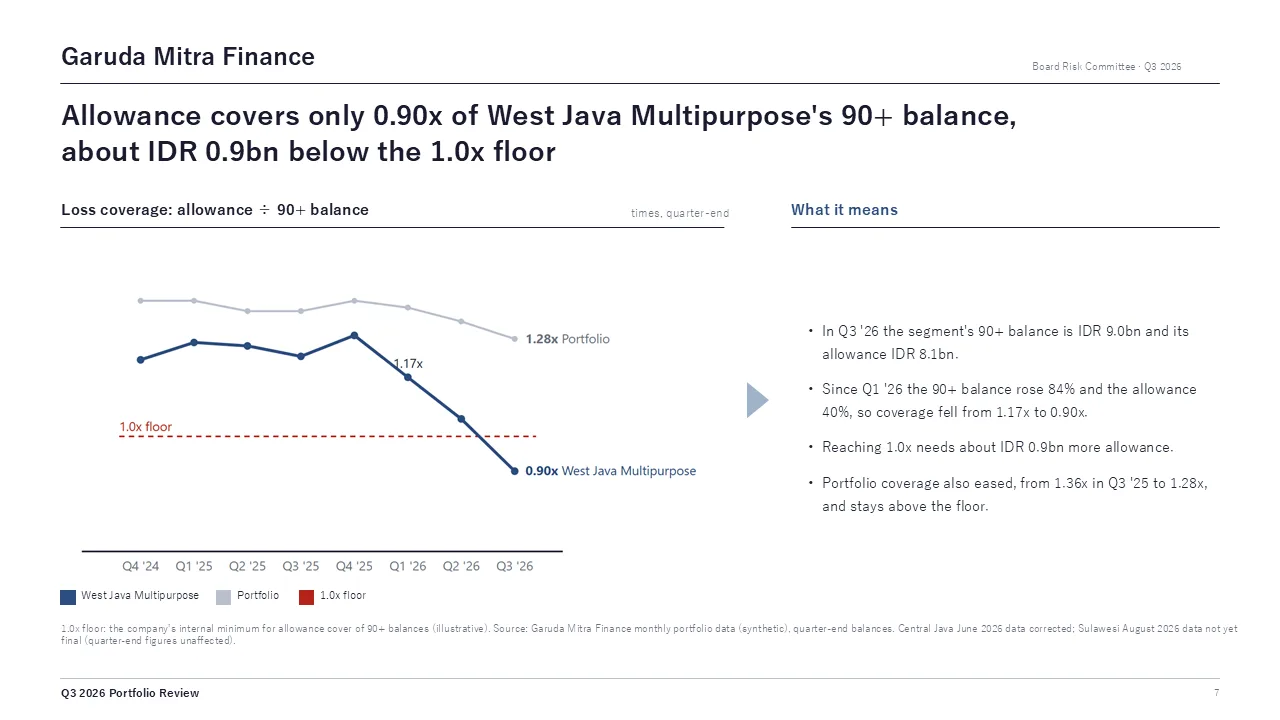
For my work, the converter doesn't change the split. I use the skill to get the logic right, and the PowerPoint add-in when a deck has to be edited, charts included.
Where it gets in the way
Two things, and both are real costs.
The rules are in Japanese. The rulebook, the review prompt and every checker message. In practice Claude reads the rules and I read its summaries. That works, but I can't skim a rule and decide for myself whether it fits an Indonesian board pack. And the review prompt checks Japanese phrasing, so for an English deck it has to be adapted every time.
The editable deck is not quite there. As described above: no PPTX at all in the version I used, and pictures for charts in the new converter.
Why I use it anyway: storyline discipline, a reviewer built into the process, and speed to a first draft: one session took this deck from an agreed definition to a reviewed PDF. A board pack with conclusion titles, sources on every page and a fresh-eye review in one session is a better starting point than a blank slide.
A checklist to try it this week
- Install it, or update it if you already have it:
git pullin~/.claude/skills/consulting-pptx-skill. - On Windows, set
PYTHONIOENCODING=utf-8(andPYTHONUTF8=1for the PPTX converter) before you start. In PowerShell:$env:PYTHONIOENCODING="utf-8"; $env:PYTHONUTF8="1". - Agree the definition and the storyline before any page is built. Most of the value is decided there.
- Read the titles alone, top to bottom. They should make the argument without the charts.
- Don't trust a clean check. Print the PDF and look at every page.
- Run the fresh-eye review and write a reason next to every finding, including the ones you reject.
Next in this series: another skill I use daily, worked through the same way. Which one would you like to see? Tell me.
Hafizh Yuwan Fauzan (Hafizh Fauzan) is a credit risk data scientist in Jakarta, Indonesia, building scorecards and machine learning models on national-scale credit data.